Understanding HeatSpring assessments
Here is a quick overview video for Instructors to see how to navigate and edit assessments. We also show some new assessment features in Student view.
wistia-player[media-id='tp9d1n9szd']:not(:defined) { background: center / contain no-repeat url('https://fast.wistia.com/embed/medias/tp9d1n9szd/swatch'); display: block; filter: blur(5px); padding-top: 56.25%; }A Guide to the Three Types of Assessments on the HeatSpring Platform
Overview
HeatSpring offers three distinct types of assessments, each designed to support different stages of the learning journey. Understanding when and how to use each type will help instructors create more effective courses and give learners the feedback they need to succeed.
This guide explains each assessment type in plain terms, along with technical details for those who want to dive deeper into assessment design.
Quick Comparison
Use this table to quickly identify which assessment type fits your needs:
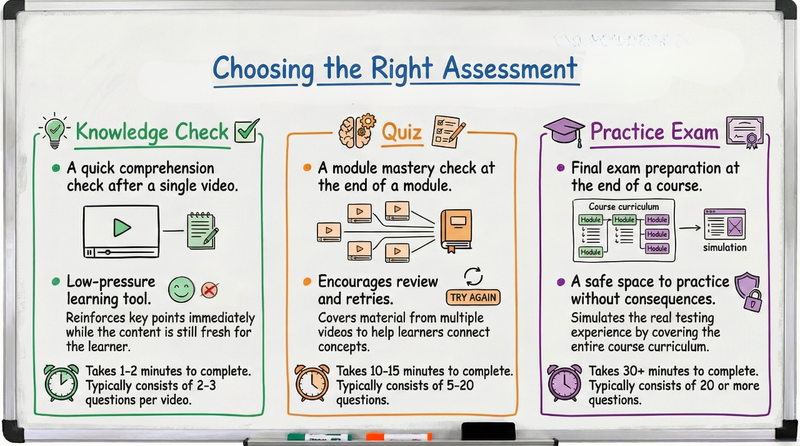
Assessment When Used Purpose Key Feature Time Knowledge Check End of video Quick comprehension check Instant feedback, skippable 1–2 min Quiz End of module Module mastery check Covers multiple videos, unlimited retakes 10–15 min Practice Exam End of course Final exam preparation Full course coverage, no grade impact 30+ minKnowledge Checks
What They Are
Knowledge Checks are brief checkpoints that appear immediately after a video. They help learners quickly confirm they understood the key points before moving on. Think of them as a moment to pause and reflect—not a test, but a learning tool.
Because they're optional and provide instant feedback, Knowledge Checks create a low-pressure way for learners to identify any confusion early, while the material is still fresh. If a learner struggles with a Knowledge Check, they know to revisit that video before continuing.
Technical Details
Knowledge Checks are formative assessments attached to individual video assignments. They feature AI-generated questions based on video transcripts, which instructors can review and curate. There is no passing percentage requirement, and learners can skip them if needed. Feedback is displayed immediately after each question is answered.
- Placement: Immediately after an individual video
- Questions: 2–3 per video
- Time: Under 2 minutes
- Feedback: Instant, per question
- Recommendation: 1 Knowledge Check per 15 minutes of video content
Quizzes
What They Are
Quizzes help learners check their understanding at the end of a module before moving on. Unlike Knowledge Checks, which focus on a single video, quizzes cover material from all the videos in a module. This gives learners a chance to see how well they've connected the concepts across multiple lessons.
Quizzes can require a passing score, but learners can retake them as many times as needed. This encourages learners to review and try again rather than getting stuck. It's about learning, not just testing.
Technical Details
Quizzes are formative assessments typically placed at the end of a module, drawing questions from multiple videos within that module. They can be required or skippable and may require a passing score to proceed. Unlimited attempts are allowed.
Two modes are available:
- Optional Mode: Score and detailed feedback are shown immediately after completing the quiz.
- Required Mode: Feedback is withheld until the learner achieves a passing score. Instructor will select "Required for completion"
- Questions: 5–20
- Time: 10–15 minutes
- Attempts: Unlimited
Practice Exams
What They Are
Practice Tests help learners prepare for an external certification by simulating the real testing experience. They pull questions from across the entire course, giving learners a realistic preview of what to expect and highlighting areas that may need more review.
Practice Tests don't count toward course completion. They're purely a study tool. Learners can take them as many times as they want without any consequences—it's a safe space to make mistakes and learn from them.
Technical Details
Practice Tests are formative, end-of-course assessments covering content from all course videos. They include a target score and allow unlimited attempts. Because they mirror the Final Exam format without the stakes, they help learners build confidence and identify weak areas before the graded assessment.
Two modes are available:
- Practice Mode: Score and feedback shown after completion.
- Exam Mode: Score and feedback shown after completion.
- Questions: 20+
- Time: 30+ minutes
- Attempts: Unlimited
- Impact on completion: None—does not affect certificate eligibility
Choosing the Right Assessment
When building your course, think about what learners need at each stage:
- After a video: Use a Knowledge Check to reinforce key points while the content is fresh.
- After a module: Use a Quiz to ensure learners have connected concepts before moving forward.
- Before certification: Offer a Practice Test so learners can self-assess and prepare.
By combining these assessment types thoughtfully, you create a learning path that supports learners every step of the way—from initial comprehension through final certification.